Array Data Group
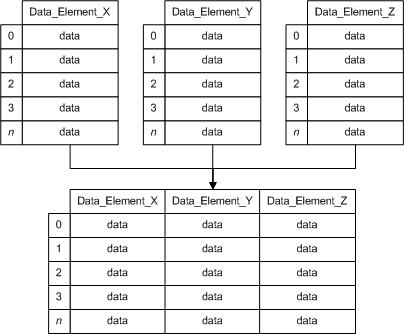
An array data group enables you to display related register data in an array (in other words, a table). Usually such register data is intended by a field device manufacturer to be displayed or consumed as an index or array. A single data group can include a combination of array and non-array data, but it can include only one array. An array data group is always read only.
There are two types of array data groups in CygNet:
- Non-Historical Array: A non-historical array retrieves multiple values at once for the same data group element. The values retrieved for one data group element can be correlated with another data group element's values to create a two-dimensional array or table where each column is a data group element and each row is a correlation of values. Non-historical array data does not receive point processing by CygNet because a current value cannot simultaneously contain multiple values. Non-historical array data is only displayed in the DDS.
- Historical Array: A historical array retrieves multiple values at once for the same data group element. It also retrieves a set of timestamps that correlate with the value(s). The values retrieved for one data group element can be correlated with another data group element's values to create a two-dimensional array or table where each column is a data group element and each row is a correlation of values. Historical array data receives point processing by CygNet because a timestamp and a value combine to form a unique historical entity. This data is displayed in the DDS, but it is also used by other services, like the UIS, VHS, and PNT.
|
Modbus EFM Array Diagram |
See the following subsections for more information:
- Example – Non-Historical Array
- Structure and Components – Non-Historical Array
- Example – Historical Array
- Structure and Components – Historical Array
- To Create an Array Data Group
For more information, see Device Template Files.
Example – Non-Historical Array
 Click here to see an example of the data group Click here to see an example of the data group
<DynaCard niceName="Dynagraph Card" hasArray="true" maxCnt="6"> <dgOrdinals> <e0 value="Current Card"/> <e3 value="Reference Card"/> </dgOrdinals> <dgElements byteOrder="bigEndian" secLev="4" cvtF="WordSwap" type="i4"> <Date desc="Card Raw Date" regDef="1:474" hidden="true"/> <Time desc="Card Raw Timestamp" regDef="1:476" hidden="true"/> <STimeD desc="Surface Card Timestamp" type="r8" cvtRef="TimeEnron" deidDate="Date" deidTime="Time"/> <CardType desc="Card Type"/> <CardDesc desc="Card Description" type="string"/> <SCnt desc="Point Count" type="ui2"/> <SLMax desc="Surface Max Load" type="r4"/> <SLMin desc="Surface Min Load" type="r4"/> <StrkLenRaw desc="Stroke Length Raw" regDef="1:94"/> <StrokeLen desc="Stroke Length" type="r4" ref="StrkLenRaw" scaleFactor=".001" units="in"/> <PSpeedRaw desc="Pump Speed Raw" regDef="1:18"/> <PumpSpeed desc="Pump Speed" type="r4" ref="PSpeedRaw" scaleFactor="0.01"/> <SPRaw desc="Surface Position Raw" regDef="2:0" arrRegOff="2" hidden="true"/> <SP desc="Surface Position" ref="SPRaw" type="r4" scaleFactor=".1"/> <SL desc="Surface Load" regDef="3:0" arrRegOff="2"/> <PumpFill desc="Pump Fillage" regDef="1:16" units="%"/> <FluidLoad desc="Fluid Load" regDef="1:240"/> <DTimeD desc="Downhole Card Timestamp" type="r8" cvtRef="TimeEnron" deidDate="Date" deidTime="Time"/> <DCnt desc="Downhole Point Count" type="ui2"/> <DPRaw desc="Downhole Position Raw" regDef="4:0" arrRegOff="2" hidden="true"/> <DP desc="Downhole Position" ref="DPRaw" type="r4" scaleFactor=".1"/> <DL desc="Downhole Load" regDef="5:0" arrRegOff="2"/> <DLMax desc="Downhole Max Load" type="r4"/> <DLMin desc="Downhole Min Load" type="r4"/> <WellState desc="State of well" regDef="1:44"/> <WStateText desc="Well state text" type="string" ref="WellState" mapVal="WellStat"/> </dgElements> <cardBlocks cardOrdinal="0" surfacePtCount="50" regByteLen="2" funcCode="3" regOff="-40001" txMaxRegCnt="124"> <card cardNum="1" surfacePtCount="200" downholePtCount="200"> <block1 regNum="57201" regCnt="477" cardRep="none"/> <block2 regNum="50001" regCnt="400" cardRep="surface"/> <block3 regNum="50401" regCnt="400" cardRep="surface"/> <block4 regNum="50801" regCnt="400" cardRep="downhole"/> <block5 regNum="51201" regCnt="400" cardRep="downhole"/> </card> <card cardNum="2" cardRep="surface"> <block1 regNum="57201" regCnt="477" cardRep="none"/> <block2 regNum="58401" regCnt="100"/> <block3 regNum="58801" regCnt="100"/> </card> <card cardNum="3" cardRep="surface"> <block1 regNum="57201" regCnt="477" cardRep="none"/> <block2 regNum="58501" regCnt="100"/> <block3 regNum="58901" regCnt="100"/> </card> <card cardNum="4" cardRep="surface"> <block1 regNum="57201" regCnt="477" cardRep="none"/> <block2 regNum="58601" regCnt="100"/> <block3 regNum="59001" regCnt="100"/> </card> <card cardNum="5" cardRep="surface"> <block1 regNum="57201" regCnt="477" cardRep="none"/> <block2 regNum="58701" regCnt="100"/> <block3 regNum="59101" regCnt="100"/> </card> <postCard> <block6 regNum="60000" regCnt="2"/> </postCard> </cardBlocks> <cardBlocks cardOrdinal="3" surfacePtCount="200" downholePtCount="200" regByteLen="2" funcCode="3" regOff="-40001" txMaxRegCnt="124"> <card cardNum="1"> <block1 regNum="57201" regCnt="477" cardRep="none"/> <block2 regNum="52801" regCnt="400" cardRep="surface"/> <block3 regNum="53201" regCnt="400" cardRep="surface"/> <block4 regNum="53601" regCnt="400" cardRep="downhole"/> <block5 regNum="54001" regCnt="400" cardRep="downhole"/> </card> <postCard> <block6 regNum="60000" regCnt="2"/> </postCard> </cardBlocks> <uccRecvParms> <Cnt desc="Card Count" type="ui2" required="false" rangeLow="1" rangeHigh="5"/> <Rep desc="Representation: 0=surface;1=surface+downhole;2=downhole" type="ui2" required="false"/> </uccRecvParms> </DynaCard> |
Structure and Components – Non-Historical Array
|
<DataGroup hasArray="true"> <dgElements> <DEID arrRegOff="" arrSize=""/> </dgElements> </DataGroup> |
Example – Historical Array
|
Click here to see an example of the data group
<!-- The data group used in the example below has two data group elements (ID and TimeRaw) and a reference data group element for each (Event and DateTime). It is an event log with 20 records. Each record is made up of an event ID and a timestamp. The 20 event IDs are in registers 31743 — 31762. Each corresponding timestamp requires two consecutive registers, which means that the 20 timestamps require 40 registers total. Timestamp(0) is in registers 31763 — 31764. Timestamp(1) is in registers 31765 — 31766. To get Timestamps(1 — 19), add arrayRegOff="2" to the TimeRaw data group element. Doing so increments timestamps two registers at a time until the array of 20 timestamps is exhausted. --> <EventShut niceName="Event Log - Shutdown" hasHistory="true"> <dgElements byteOrder="bigEndian" secLev="4"> <ID desc="Event ID" regNum="31743" type="ui2" arrSize="20" hidden="true"/> <Event desc="Event" type="string" arrSize="20" ref="ID" mapVal="EEvent"> <EEvent> <e101 value="101-Pump Start"/> <e102 value="102-Op Stop HMI"/> <e111 value="111-DT Pump Fillage"/> </EEvent> </Event> <TimeRaw desc="Time Raw" regNum="31763" type="ui4" arrSize="20" arrRegOff="2" hidden="true"/> <DateTime desc="Timestamp" type="r4" arrSize="20" cvtRef="TimeTLocal" deidTime="TimeRaw"/> </dgElements> <modbusReadBlocks regByteLen="2" regOff="-30001"> <block1 regNum="31743" regCnt="60" funcCode="4"/> </modbusReadBlocks> </EventShut> |
Structure and Components – Historical Array
|
<DataGroup hasHistory="true"> <dgElements> <DEID arrRegOff="" arrSize=""/> <DateTime desc="Timestamp" type="" arrSize="" cvtRef="" deidTime=""/> </dgElements> </DataGroup> |
- Using a text editor or XML editor, open the device template file to which you want to add an array data group. You might need to extract the device template file from a Device Definition Service (DDS) in order to edit it.
- Define a DataGroup element for the applicable data group. Add the attribute hasArray or hasHistory and set its value to true.
- Define a dgElements element that includes all required data group elements.
- For each array data group element, set its arrRegOff and/or arrSize attributes to a value that correlates with all other array data group elements in the data group so that array values properly correlate in your table.
- If this data group includes a historical array, include a DateTime element to supply timestamps.
- Define blocks to supply data to the array data group elements.
- Save your edits.
- Validate the template, then load it to the applicable DDS. See CygNet Device Template Manager Utility.
- From the applicable DDS, poll the affected device to test data retrieval and confirm the data group works as expected.


